Reijor Enterprises, LLC

Software built for the way insurance actually gets placed.

We make MarketEdge, a management platform for agencies, brokers, and underwriters who serve the transportation industry — the workspace where a trucking account is built once and sent to every MGA at once, each submission carrying the forms and documents that MGA needs for its carriers.

The Product

One workspace for the transportation insurance account.

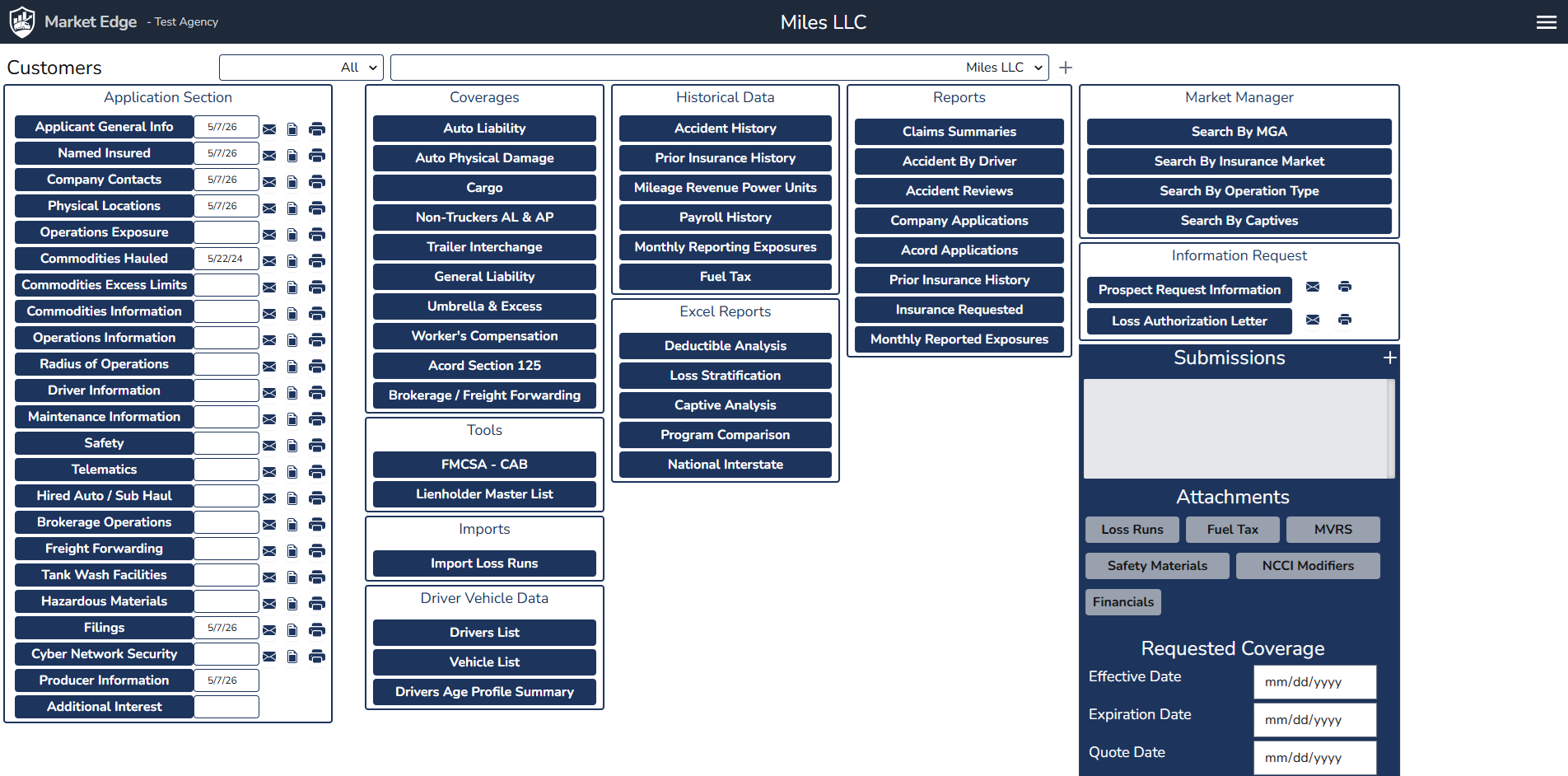
A trucking submission can involve dozens of supplementals, a roster of drivers and equipment, five years of loss history, payroll and mileage breakdowns, MVRs, fuel tax filings, financials, and a stack of ACORDs. MarketEdge consolidates the data normally spread across spreadsheets, paper applications, scanned PDFs, and email folders into a single application — entered once, lived with the account, and reused every time the risk is sent to a new market. A new account starts from its DOT number, with the company, filings, and safety record filled in from FMCSA, and your trucking clients can keep their own driver and vehicle lists current.

MarketEdge dashboard for a demonstration account, showing the application sections with last-updated dates, coverages, historical data, driver and vehicle data, analysis tools, reports, attachments, and market manager.
The account dashboard, shown with Over the Road Trucking, a demonstration account.

The Submission Builder

Send every MGA its submission — all at once.

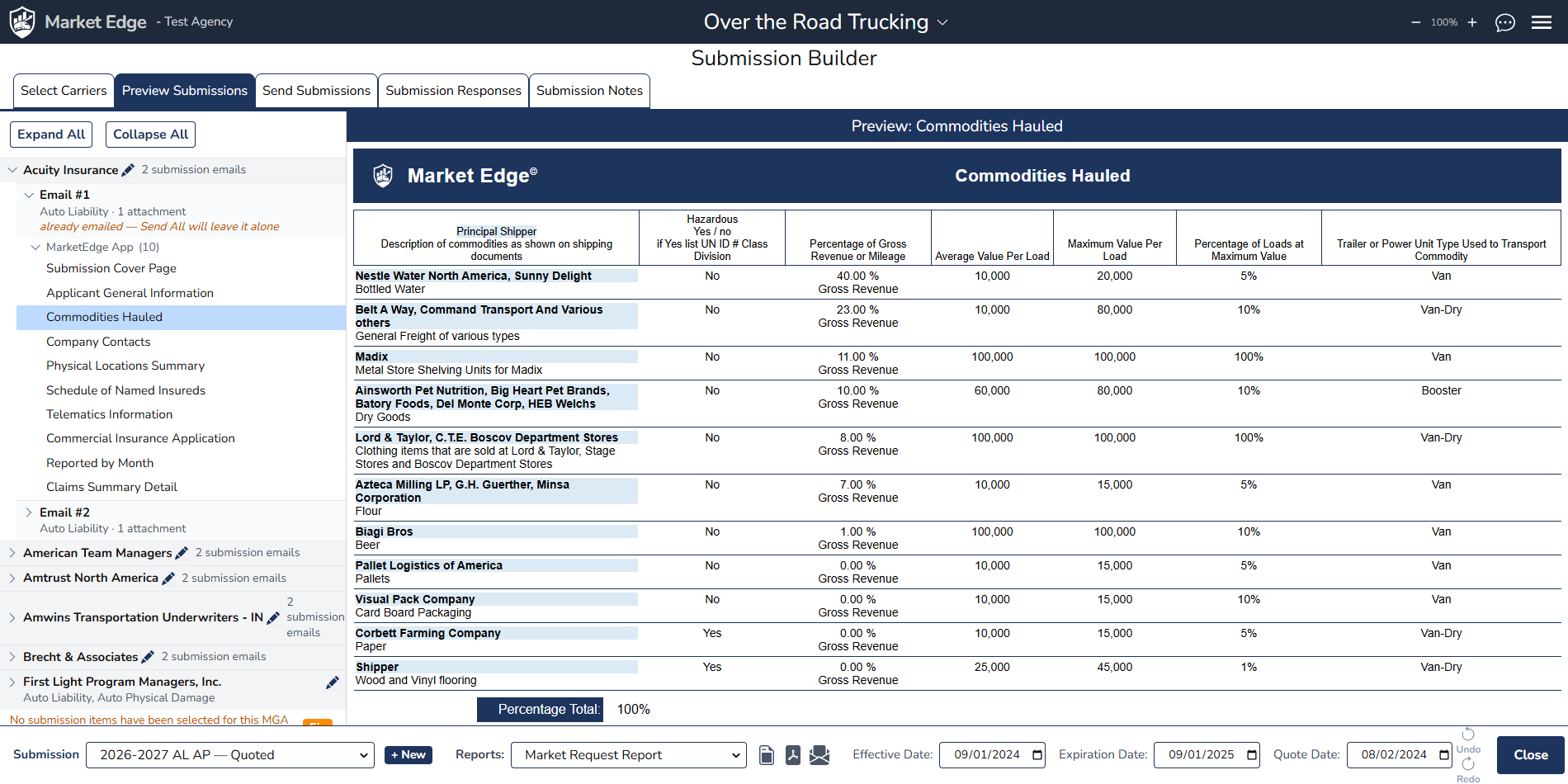
The Submission Builder is the heart of MarketEdge. Pick the MGAs and carriers for the account, and MarketEdge builds a separate submission email for each MGA, carrying every application and document that MGA needs for the carriers it's appointed with. Preview any package down to the page, then send dozens of submissions with one Send All, from your own email address. As the markets respond, indications, quotes, and declinations go on one worksheet, with GAP flags on any line nobody has quoted.

Submission Builder, Preview Submissions tab: one MGA's two submission emails and the sections of its package, with the Commodities Hauled report open in the preview pane.
Preview Submissions: each MGA's emails and every section of its package. Shown with Over the Road Trucking, a demonstration account.

Built for

The people who place transportation risks.

  • Retail agents & brokersplacing transportation accounts
  • Wholesale brokers & MGAsmanaging submissions across carriers
  • Account managers & CSRsmaintaining renewal accounts
  • Producers & account executivesprospecting and quoting new business
  • Loss control & underwritinganalyzing exposures and loss history
  • Agency principalstracking the book, markets, and production

What it does

Everything a transportation submission needs — in one place.

Submission Builder

Send dozens of submissions to different MGAs with one Send All, each carrying the applications and documents that MGA needs for its carriers. Preview every package first, and track indications, quotes, and declinations on one worksheet.

Client Access

Give your trucking clients a login to their own account, so they keep their driver and vehicle lists current as the fleet changes and renewal starts from the right numbers. They see only the pages you choose, never your markets or submissions.

Lead Finder

Every night MarketEdge reads FMCSA's public data for trucking companies about to need insurance: new DOT numbers, liability filings cancelled with nothing to replace them, and pending authority with no insurance on file. Each prospect shows how many of your appointed markets could write it.

Start From a DOT Number

Enter a DOT number and the file starts itself from FMCSA — name and address, filings, the named insured, officers, fleet size, mileage, and the full safety record.

Application Data Capture

The full set of information carriers expect on a trucking risk — applicant info, operations, commodities, hazmat, supplementals, and every line from Auto Liability to Workers' Comp — structured, reusable, and ready to flow into every application.

Drivers, Vehicles & History

Driver rosters, power units and trailers with VINs, values, and lienholders, plus mileage, revenue, payroll, and fuel tax history. Your team enters them, the client keeps them current, or they come straight from the client's Samsara account.

FMCSA Safety Analysis

Estimated percentiles for all seven BASICs with alert flags, the ISS score, safety rating, out‑of‑service rates against national averages, and crash and inspection detail — refreshed nightly.

Company Strengths

Thirty-two factors that make an account better than average, each measured against an industry benchmark. The ones the account meets are written into your first submission email.

Loss Analysis

Loss stratification, deductible analysis, and single‑parent captive modelling, built from the loss history already in the account.

Market Manager

Carriers, MGAs, and captives with AM Best ratings, your appointments, and contacts. Market search starts from the account's state, fleet size, operations, and lines, and returns the appointed markets that write them.

Applications & Reports

ACORD 125, 126, 130, and 131 and more than fifteen carrier applications, as Excel workbooks and fillable PDFs, filled from the account. Combine reports, applications, and attachments into one bookmarked PDF.

AI That Knows the Account

Agents already use AI chat to read contracts, policies, and loss runs, but a general chat knows nothing about the client. Lisa, MarketEdge's built‑in assistant, works from the client's own records and filed documents, so it can check a shipper contract's insurance requirements against what the client carries. Optional imports read the documents clients send into review screens. MarketEdge does not depend on AI; everything else works without it.

A typical workflow

From prospect to bound — without leaving the application.

The data is entered once, lives with the account, and is reused at every renewal and every time the risk is sent to a new market. Reports, applications, and submission packets are generated from the same underlying data, so they stay in sync as the account changes.

  1. 1A prospect turns up in Lead Finder, or is added from a DOT number.
  2. 2FMCSA fills in the company, its filings, officers, fleet, and safety record.
  3. 3A Loss Authorization Letter and loss‑run requests go to prior carriers.
  4. 4Returned loss runs and documents are added to the account.
  5. 5The application is completed — by your team, with the client keeping the driver and vehicle lists current.
  6. 6The safety picture and the account's strengths are reviewed.
  7. 7Market search finds the appointed MGAs and carriers that fit.
  8. 8The Submission Builder assembles each MGA's package: ACORDs, carrier applications, loss runs, reports.
  9. 9Send All emails every MGA its submission from the producer's own address.
  10. 10Indications, quotes, and declinations are tracked on one worksheet.
  11. 11The winning quote is marked bound.
  12. 12At renewal, the client's lists are already current; only what changed needs updating.

The Company

Who Reijor is.

Reijor Enterprises, LLC is a software company building tools for the insurance industry. Our focus is the transportation line — the trucking risks where data, documents, and deadlines pile up faster than any spreadsheet can hold them.

We're a small team. We work closely with the agencies that use our software, and we ship the things they actually need to place business.